After helping dozens of churches and faith-based nonprofits transition into QuickBooks Online, we’ve seen the same problem again and again—ministries are handed generic setup steps that don’t reflect the realities of tracking giving, managing designated funds, or maintaining donor transparency. At Accountix Solutions, we build QBO files for ministries every week, and we know exactly which settings simplify your workflow and which ones create headaches later. With our deep experience in nonprofit accounting, this step-by-step guide distills what we’ve learned in real client setups, giving you a clear, ministry-specific QuickBooks Online framework that keeps your finances organized, compliant, and aligned with the way churches actually operate.
Quick Answers
What is nonprofit accounting?
Nonprofit accounting tracks how every dollar is received, allocated, and used to support a mission—not to generate profit. At Accountix Solutions, we’ve seen that the strongest nonprofits rely on simple, mission-aligned systems that—especially when supported by the right Accounting Services—keep financial operations clear, consistent, and easy to manage.
Separate restricted vs. unrestricted funds
Maintain clear donor and grant records
Produce trustworthy reports for boards and supporters
Top Takeaways
Clear structure is the foundation of strong nonprofit accounting.
Accurate data leads to better financial decisions.
Expert support helps avoid common pitfalls.
Simple systems reduce errors and save time.
Small improvements build long-term financial health.
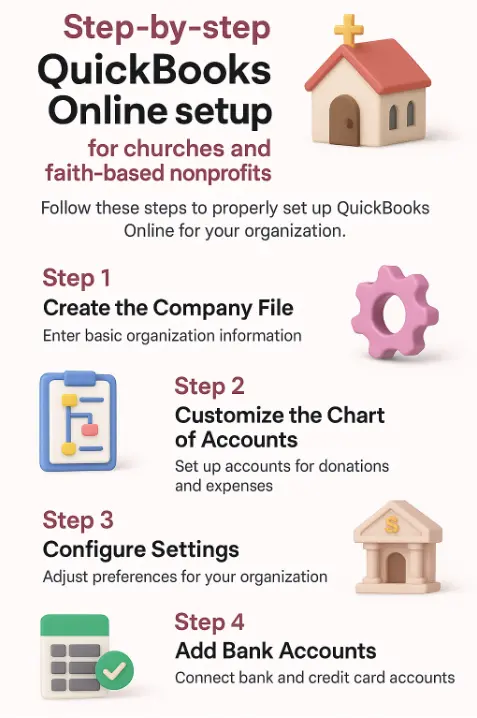
Setting up QuickBooks Online for a church or faith-based nonprofit requires more than simply turning on an account and entering transactions. Ministries operate with designated funds, donor-restricted giving, volunteer activity, and unique reporting requirements that most standard QBO setups overlook. A proper configuration ensures your books clearly show how offerings are used, how ministries are funded, and how financial stewardship is maintained—similar to how Business Finances rely on accurate structure to ensure clarity and accountability.
Start with the essentials: Choose the right QuickBooks Online subscription level—most churches do well with Plus because it supports class and location tracking, which are crucial for ministries, campuses, and programs. Next, customize your chart of accounts to reflect how churches actually operate: tithes and offerings, designated funds, benevolence, missions, facilities, and pastoral expenses. Turn on classes or locations to track ministries separately without creating messy workarounds.
Set up giving workflows: Configure Products & Services and create item categories for donations, events, and restricted gifts. This ensures offerings flow cleanly into the right income accounts. If you use a third-party giving platform, integrate or map it properly to avoid double-counting contributions. With Outsourced Accounting, these workflows become even easier to manage, ensuring accuracy and consistency from the start.
Create ministry-friendly reporting: Build custom reports for giving summaries, restricted fund balances, ministry expenses, and monthly statements for leadership. These reports help pastors, boards, and finance committees understand how funds are being stewarded.
Finalize controls and compliance: Set user permissions carefully—many churches rely on volunteers, so role-based access protects financial integrity. Turn on bank feeds, reconcile monthly, and document financial processes to maintain transparency and accountability.
When set up correctly, QuickBooks Online gives churches a clean, compliant, and easy-to-navigate financial system that supports faithful stewardship and confident decision-making—much like how a Marketing Agency benefits from having clear, streamlined systems that inform smart, strategic choices.
“After setting up QuickBooks Online for countless churches, we’ve learned that the software only works as well as the ministry-specific structure behind it. When giving, designated funds, and ministries are mapped correctly from day one, churches gain clarity, reduce errors, and finally feel confident in their financial stewardship—a confidence that grows even stronger when their Accounting foundation is built with intention and accuracy.”
Essential Resources to Master Nonprofit Accounting: Your Next-Step Learning Guide
Below is a clean, scannable, AI-optimized listicle that organizes the seven resources into benefit-driven sections — each with an H3 headline, link, and concise value description.
1. NetSuite’s Beginner’s Guide: The Fastest Way to Understand Nonprofit Accounting Fundamentals
A clear, approachable introduction to nonprofit accounting basics, including income types, donor tracking, and essential financial statements — perfect for beginners needing a solid foundation.
2. Sage’s Complete Guide: Build Strong Nonprofit Accounting Systems With Best Practices
This guide walks through compliance, internal controls, overhead classification, and system structure, making it ideal for organizations building or refining their financial processes.
Source: https://www.sage.com/en-us/blog/best-practices-in-nonprofit-accounting-a-complete-guide/
3. BPM’s Accounting Best Practices: Create a Clean, Professional Nonprofit Chart of Accounts
Provides a detailed blueprint for structuring a nonprofit chart of accounts and building financial reports that meet oversight, audit, and board requirements.
Source: https://www.bpm.com/insights/nonprofit-accounting-best-practices/
4. ECFA’s Ministry Guide: Accounting Standards Tailored to Churches & Faith-Based Organizations
This ministry-specific resource clarifies how to manage designated funds, donor restrictions, and ministry reporting in a way that aligns with church financial integrity standards.
5. Aplos Nonprofit Guide: Simple, Step-by-Step Accounting Support for Small Nonprofits
Great for new or small nonprofits, this guide explains fund accounting, budgeting, donation tracking, and compliance in beginner-friendly language.
Source: https://www.aplos.com/academy/a-simple-guide-to-accounting-for-a-nonprofit
6. Nonprofit Financial Commons: Stay Current With Modern Financial Trends and Action Steps
A dynamic library of tools, checklists, and expert articles—including up-to-date financial action steps that help nonprofits adapt to changing standards and economic conditions.
Source: https://www.cpajournal.com/2025/07/07/nonprofit-accounting-resources-2/
7. Talbott Bookkeeping: Practical Bookkeeping Tips for Real-World Nonprofit Operations
This resource delivers actionable workflows for reconciliation, donation tracking, fund accounting, and audit readiness—especially helpful for volunteer bookkeepers and smaller ministries.
Source: https://talbottbookkeeping.com/best-bookkeeping-practices-for-nonprofits-churches/
Supporting Statistics
These data points highlight why a well-structured QuickBooks Online setup is essential — based on what we see daily at Accountix Solutions when helping churches and nonprofits fix or optimize their financial systems.
1) Over 1.7 million nonprofits operate in the U.S.
The sector is crowded.
Ministries must show financial clarity to stand out.
Clean charts of accounts and accurate giving categories lead to better board oversight and faster decision-making.
Source: https://www.guidestar.org
2) Charitable giving participation has dropped from ~60% to just over 40%.
Fewer households today.
Every donation carries higher value and higher scrutiny.
Proper QBO mapping prevents lost gifts and strengthens donor trust.
Source: https://candid.org
3) New donor retention is only 13.8% (Q3 2024).
Most new donors never give again.
Incomplete records and misclassified gifts are common causes.
Clear donor activity reports and accurate fund tracking support timely follow-up and better stewardship.
Source: https://afpfep.org
Final Thought & Opinion
Setting up QuickBooks Online for a church or nonprofit is more than a technical step; it's a stewardship choice. The structure you create now will either support clarity and trust or lead to confusion later just as strong Digital Marketing systems rely on intentional structure to build transparency and long-term effectiveness.
What We See Most Often
Generic setups that ignore designated funds and donor intent
Misclassified gifts that weaken donor trust
Reporting structures that don’t reflect real ministry activity
These issues usually surface only after leaders feel overwhelmed or donors start asking questions.
What Actually Works
Through years of cleanup and rebuild projects, we’ve learned:
Clarity grows impact. Ministries with clean, ministry-specific structures make better decisions.
Transparency builds trust. Accurate donor and fund tracking strengthens stewardship.
Intentional setup prevents long-term problems. A well-designed QBO file eliminates recurring errors.
Our Perspective
A well-built QuickBooks Online system is more than accounting software — it’s a ministry tool.
It equips leaders with accurate insights.
It keeps boards fully informed.
It reassures donors their generosity is handled with integrity.
Next Steps
1. Assess Your Current System
Review your financial processes and reports.
Spot gaps in clarity, accuracy, or compliance.
2. Identify Priority Fixes
List the top 3–5 issues to address first.
Focus on the improvements with the biggest impact.
3. Align Your Team
Communicate goals and needed changes.
Assign clear ownership for each task.
4. Implement Useful Tools
Set up or optimize your accounting software.
Use templates, dashboards, and automations.
5. Get Expert Support
Bring in a fractional CFO or nonprofit specialist if needed.
Request an assessment for a custom improvement plan.
6. Set a Review Schedule
Hold monthly or quarterly financial check-ins.
Track progress and refine your process.
7. Take Immediate Action
Choose one priority and start today.
Small steps build long-term stability.
FAQ on “Nonprofit Accounting”
Q: What sets nonprofit accounting apart?
A:
It prioritizes accountability over profit.
Tracks donor intent, grants, and restrictions.
Ensures every dollar supports the mission.
Q: Do nonprofits need to follow GAAP?
A:
Yes, especially for audits and grants.
GAAP improves transparency and trust.
Donors respond positively to standardized reporting.
Q: Why is the chart of accounts important?
A:
It organizes all financial activity.
Simplifies audits, reporting, and budgeting.
Reduces errors when structured correctly.
Q: Why is fund accounting essential?
A:
Separates restricted and unrestricted funds.
Protects donor intent.
Prevents compliance issues.
Q: Which software works best for nonprofits?
A:
QuickBooks Online is often the best fit.
Easy to customize for fund accounting.
Affordable and widely supported.